Cofactor nodes
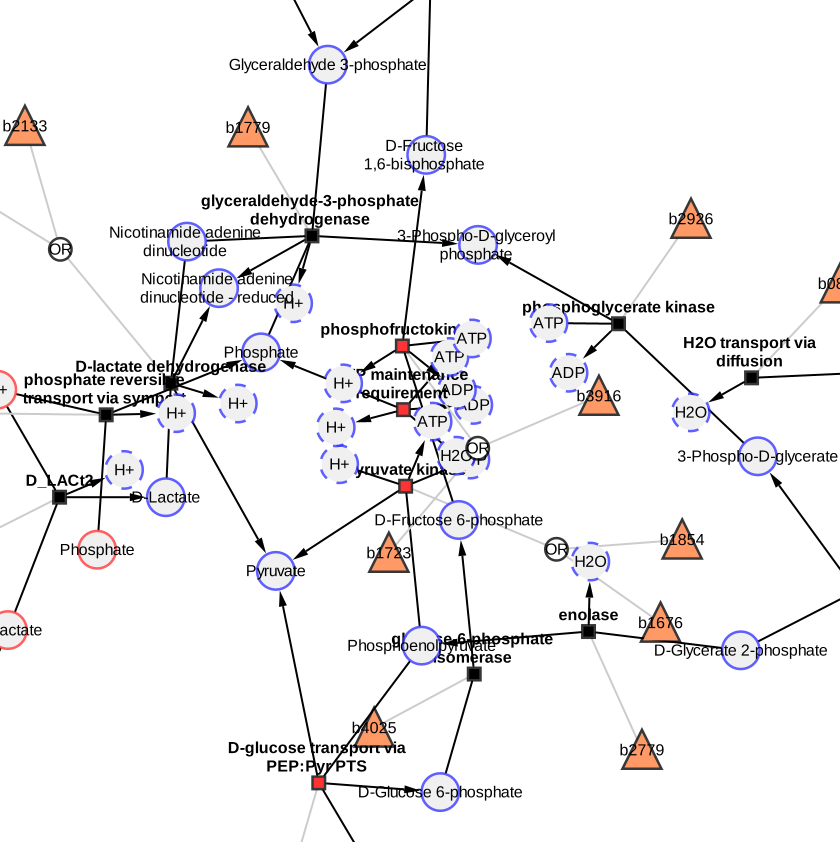
Cofactors like ATP, ADP, NAD or water take part in many reactions. In the network, their nodes connect to many reactions, which pulls the layout together and hides the structure of the pathway. cy3sbml splits such nodes into one node per edge, and merges them back.
Split cofactor nodes
- Select one or more nodes in a network imported by cy3sbml.
- Click Split cofactor nodes in the toolbar.
Every selected node with N edges is replaced by N clones. Every clone has one of the
edges of the node, a copy of its table values and is placed next to the node at the other
end of its edge, in the direction of the split node; the clones at one node are spread so
that they do not overlap. The clones are drawn with a dashed border and have the value
true in the column cofactorClone. The info panel shows the SBML element of the node
for its clones.
Nodes with fewer than two edges, group nodes and clones are not split.
Merge cofactor nodes
- Select one or more clones, or nothing.
- Click Merge cofactor nodes in the toolbar.
The clones of every node with a selected clone are merged into the node. If no clone is
selected, all split nodes of the network are merged. The node gets its edges and its
position before the split back, so splitting and merging leaves the network unchanged,
also if nodes connected to each other (for example a species and its compartment in the
__all network) are split and merged in any order.
Notes
- The buttons are enabled only if the current network was imported by cy3sbml. The help page of the info panel has links to both actions.
- Splitting and merging only change the current network, the other networks of the model are not changed.
- The split nodes of every network are saved in Cytoscape sessions and restored when the session is opened.
- The clones have the
cyIdof their node. Load Layout therefore moves all clones of a node to the same position.