Info panel and annotations
The cy3sbml panel on the right side of the Cytoscape window shows the SBML information of the selected object. Click Hide|show panel in the toolbar to hide or show it.
What the panel shows
The panel follows the selection in the current network:
- If no node is selected, it shows the SBML document and the model. For a document imported from a COMBINE archive, it shows the archive and its files as well, see COMBINE archives.
- If nodes are selected, it shows the SBML object of the first selected node.
- The nodes of base units like
molethat are not defined in the model have no SBML object. The panel then shows "No information". - If the current network was not imported by cy3sbml, the panel shows that no SBML document is associated with it.
For the selected object, the panel shows in this order:
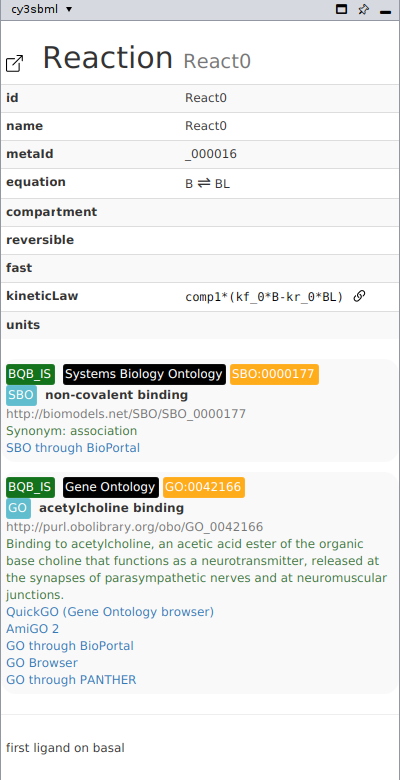
- The SBML class and the id, for example Reaction
React0. -
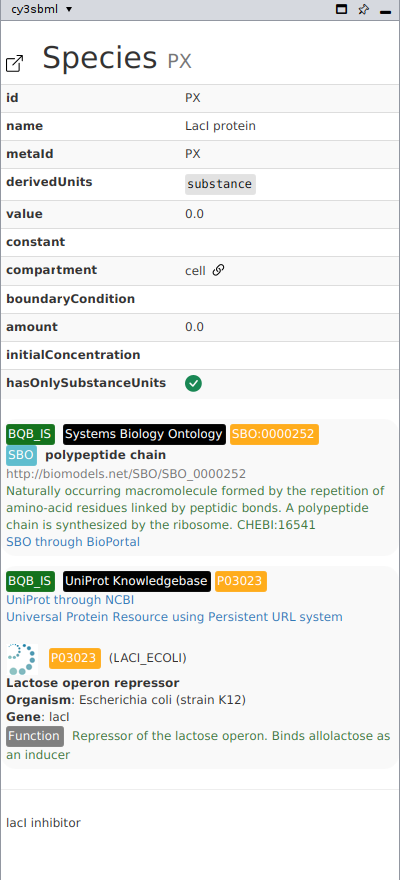
A table with the SBML attributes of the object, for example the formula of the kinetic law of a reaction, or the initial values of a species. Ids of referenced objects, for example the compartment of a species, have a link icon. Clicking it selects the node of the referenced object. For a reaction, the table also shows:
- the equation, for example
2 A + B ⇌ C; E: the reactants and products with their stoichiometries,⇌for a reversible and→for an irreversible reaction,∅for no reactants or products, and the modifiers after the semicolon. A stoichiometry that is not set but determined by a rule shows the id of the species reference; - the fbc flux bound parameters with their values and links to their nodes, for
example
ub = 1000; - the coefficient of the reaction in each fbc objective of the model, in the row
fbc_objective-<objective id>, like the network column of the same name, and the variable type of fbc version 3 in the rowfbc_objective-<objective id>_variableType.
For an fbc user defined constraint, the table shows the bound parameters with their values, the constraint, for example
five ≤ one · RGLX + negone · RBTK ≤ five, and a row per component with its variable type and links to the nodes of its variables.For a group, the table lists the members with their element name, their reference and a link to their node.
- the equation, for example
-
The uncertainties of the object (distrib package), see distrib.
- The key-value pairs of the object (fbc version 3): key, value and the URI that defines the key.
- The model history: creators with email and organisation, the creation date and the modification dates.
- The annotations (see below).
- Annotations that are not RDF, for example SABIO-RK data, as formatted XML.
- The notes.
Links to external web pages (http, https, ftp and mailto) open in the web browser
of the system; other links, for example to local files, are not opened. The info panel
runs no JavaScript, and the texts of the model and of the web services are shown as text,
so a model cannot add scripts or markup to the info panel.
Open the model in sbml4humans
sbml4humans shows an SBML model as an interactive, human readable report. The sbml4humans icon in the row of the model, next to the SBML icon, opens the model of the current network in sbml4humans in your web browser:
- cy3sbml writes the SBML document of the network into a COMBINE archive, together with the files of its comp external model definitions, so sbml4humans resolves the external models like cy3sbml does. External models that are not files next to the model (for example a URL) are left out.
- The archive is uploaded to sbml4humans, which keeps it for 24 hours. The report opens at the model of the network: the main model, a comp model definition, an external model or the flat model. Anyone with the address of the report can open it until the upload expires, so you can share it.
- Before the first upload, cy3sbml asks whether you want to upload the model. Check
Don't ask again to upload without asking; the answer is the property
cy3sbml.sbml4humans.confirmed=trueofcy3sbml.props(Edit > Preferences > Properties), remove it to be asked again.
The model is sent to a public server. Do not use the icon for models that must stay private. A model of at most 100 MB can be uploaded.
The properties cy3sbml.sbml4humans.url (default https://sbml4humans.de/) and
cy3sbml.sbml4humans.api (default <url>api/) set the server, for example a local
sbml4humans for development, with the frontend on http://localhost:3456/ and the api on
http://localhost:1444/api/.
Annotations
cy3sbml shows the controlled vocabulary (CV) terms of the RDF annotation, and the SBO
term of the object as an annotation with the qualifier BQB_IS. For every resource of a
CV term, the panel shows:
- the qualifier, for example
BQB_ISorBQB_IS_DESCRIBED_BY, - the name of the data collection, for example Gene Ontology, and the identifier, which links to the first resource of the collection,
- links to all resources of the collection that are not deprecated, for example QuickGO and AmiGO 2 for Gene Ontology terms,
- the term information from the web services listed below.
Resource URIs are resolved with the identifiers.org registry
(MIRIAM). Both URI forms are resolved, for example
https://identifiers.org/GO:0042166 and http://identifiers.org/go/GO:0042166.
The panel warns about two annotation problems:
- Identifier does not match pattern: the identifier does not match the identifier pattern of the collection in the registry.
- Unknown data collection: the collection of the URI is not in the registry. The panel then shows the plain URI.
Web services
| Service | Used for | Shown information |
|---|---|---|
| identifiers.org registry | all resources | collection name, identifier pattern, resource links |
| Ontology Lookup Service (OLS4) | ontology terms, for example GO, SBO, ChEBI, NCBITaxon: the term of the OLS resource of the collection in the registry | term label, description, synonyms |
| UniProt REST API | uniprot resources |
protein name, EC number, organism, gene, synonyms, function, catalytic activity, pathway |
| ChEBI | chebi resources |
formula, charge, mass, structure image |
The registry is part of the app, so annotations are resolved without network access. After the start of Cytoscape, cy3sbml downloads the current registry from identifiers.org in the background and uses it once the download is complete.
The results of OLS, UniProt and ChEBI are cached in memory while Cytoscape runs, so selecting an object again does not repeat the requests. Terms that were not found are cached for a limited time, then requested again.
Annotations as table columns
The import also stores the annotations in the node table, one column per data collection. See Network model.