Importing SBML
cy3sbml registers an SBML reader in Cytoscape. Every way of loading a network file in
Cytoscape uses it for SBML files. An import creates a network collection per model with
three networks, and one more network per layout of the layout package, see
Network model.
Which files are read as SBML
A file is read by cy3sbml if its first 20 lines contain the SBML namespace
http://www.sbml.org/sbml/, whatever its file extension. The file dialog of
Import SBML lists files with the extensions .xml and .sbml, files without
extension, and COMBINE archives (see below). All SBML levels and versions are supported.
The file is decoded with the encoding declared in its XML declaration (UTF-8 if none is declared).
Import SBML files
Use one of these ways:
- Click Import SBML in the toolbar and select one or more files. Every selected file is imported.
- Use the Cytoscape menu File → Import → Network from File....
- Drag SBML files onto the Network panel of Cytoscape (it shows "Drag network files here" while it is empty).
- Import from a script or another program with the command
cy3sbml import(a file, a URL, an SBML string or a BioModels id), for example through CyREST from Python, see Automation and REST API. The Cytoscape commandnetwork load file file=<path>works as well.
After the import, cy3sbml applies its visual style and the force-directed layout to every network view; the views of the layout networks get the layout style and the positions of the glyphs. The base network of the main model is shown. See Styles and Layouts.
Example models
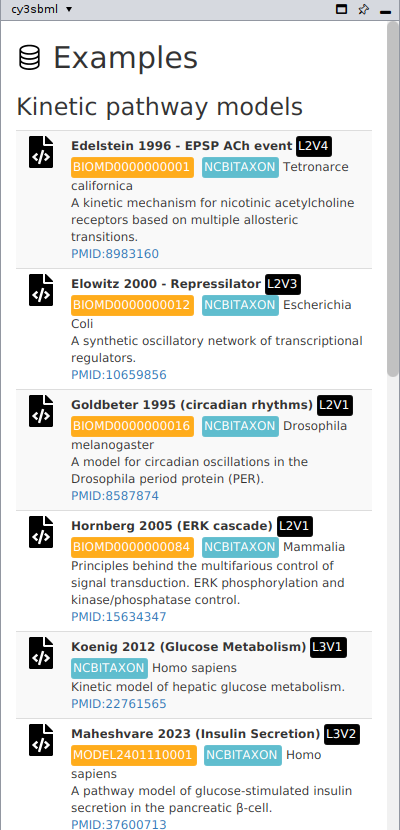
Click SBML examples in the toolbar. The cy3sbml panel shows a list of example models, which are part of the app. Click the import icon of an example to load it. The examples cover:
- kinetic pathway models from BioModels (for example Edelstein 1996,
BIOMD0000000001, and the repressilator,BIOMD0000000012), and models of hepatic glucose metabolism and insulin secretion, - physiologically based pharmacokinetic (PBPK/PD) models of glimepiride and rivaroxaban,
with their liver, kidney and intestine submodels, which use the
comppackage, - qualitative signaling models (
qualpackage), among them the KEGG pathwayhsa04360with a layout of thelayoutpackage, - large-scale models: constraint-based models (
fbcpackage) from BiGG, for examplee_coli_core, and HepatoNet1, a reconstruction of human liver metabolism.
BioModels
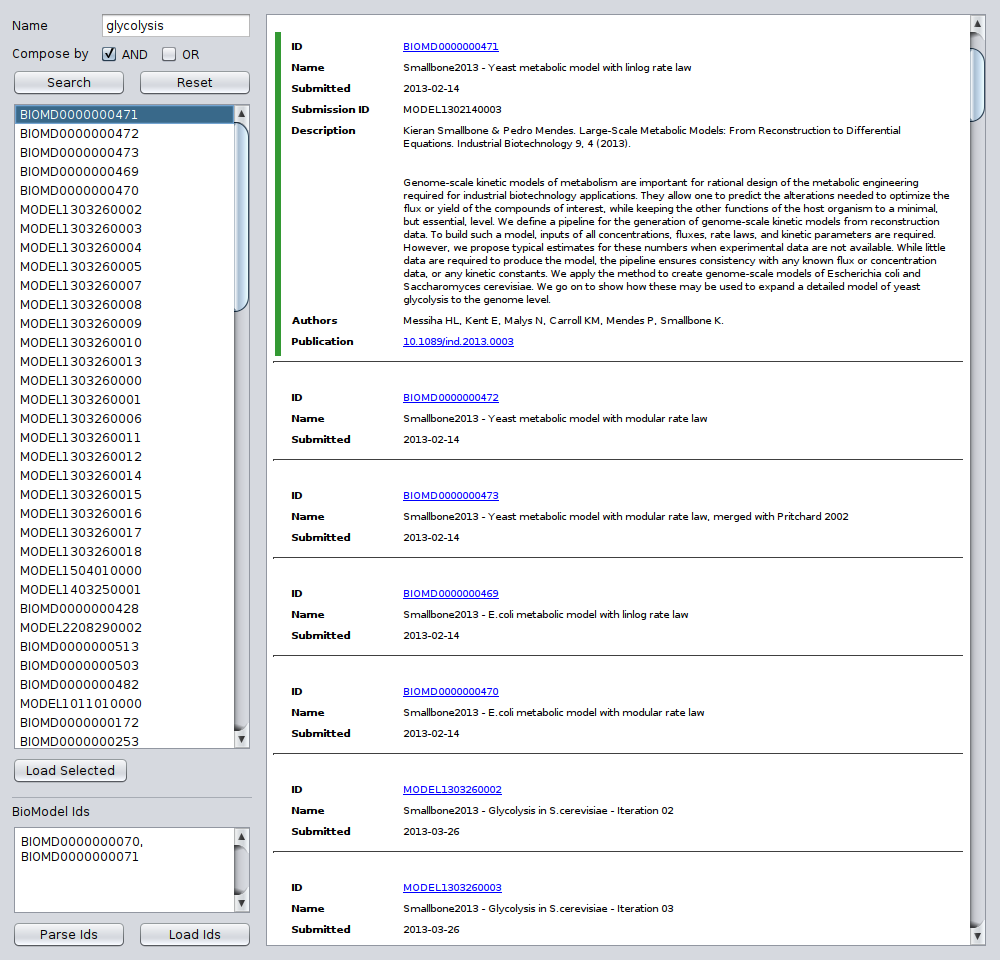
Click BioModels Import in the toolbar to open the dialog cy3sbml BioModels Import. It loads models from BioModels in two ways:
- Search: type search terms in the Name field and click Search (or press Enter). BioModels searches the terms in the whole model entry, for example the model name, description, authors, publication and annotations. Compose by combines several terms with AND (all terms must match) or OR (any term matches). Up to 1000 results are listed, with their name and dates on the right. Select model ids in the list to see their details (description, authors and publication). Select one or more ids and click Load Selected to import them.
- By identifier: type or paste text with BioModels identifiers (
BIOMDorMODELfollowed by 10 digits, orBMIDfollowed by 12 digits) into BioModel Ids. Any text that contains identifiers works. Parse Ids lists the models with their details, Load Ids imports them.
Reset clears the search field. The requests to BioModels run in the background and
can take a few seconds; closing the dialog stops a running search. The dialog closes
when models are loaded: Cytoscape downloads the SBML of every model into the folder
biomodels of the cy3sbml directory (~/CytoscapeConfiguration/cy3sbml/biomodels) and
imports it like a file, and reports the models that could not be downloaded.
If BioModels cannot be reached, the dialog says so. Check the internet connection and
the proxy settings, or download the SBML file from the BioModels website and import it
as a file.
Several models in one file
A file with the comp package can hold model definitions in addition to the main model,
and refer to models in other files with external model definitions. cy3sbml creates a
network collection for the main model, for every model definition, for the model of every
external model definition, and, if the main model has submodels, for the flattened model.
The external files are found relative to the location of the imported file, so keep them
next to it and import it from the file system or from a URL. See
Supported SBML packages.
COMBINE archives
A COMBINE archive (OMEX) is a zip file with models, simulations, data and metadata, and a manifest that lists its files. cy3sbml imports the SBML models of an archive like SBML files: open the archive with Import SBML, File → Import → Network from File..., drag and drop, or CyREST.
- Which files: archives with the extensions
.omex,.sedx,.sbex,.cmex,.sbox,.neuxand.phexare read. Other zip files are not. - Which models: the SBML files the manifest marks as master. If no SBML file is master, all SBML files of the archive are imported. Every imported model gets its network collections as an SBML file does.
- Files of the archive: SBML files the imported models reference, for example the external model definitions of a comp model, are read from the archive. The other files (simulations, data, images) are not imported.
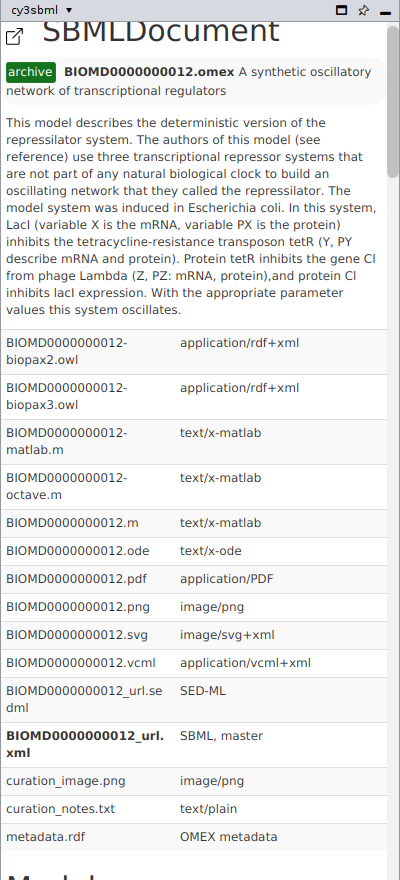
- Info panel: the info panel of the SBML document shows the archive: its name, title,
description and creators from its metadata, and its files with their format; the
imported file is bold. The root network has the column
archivewith the name of the archive. Both are kept in saved sessions. - Limits: an archive is imported only if it has at most 100000 entries and at most 4 GiB unpacked, and only if all its entries and manifest locations are inside the archive; this protects against damaged or malicious archives.
An archive without SBML files, a damaged archive, or an SBML file of the archive that cannot be read is reported; the other models of the archive are still imported.
Errors while reading
If a file cannot be read, for example because it is not well-formed XML, Cytoscape shows the error of cy3sbml. The message names the file, a short cause with the line in the file for XML errors, and a link to the SBML validator. No network is created for such a file. See Validation.